
How Much Does a WordPress Website Cost in 2026?
WordPress website pricing in 2026 can range from a simple freelancer-built business site to a complex custom platform costing tens of thousands of dollars. This guide explains what actually changes the price, what a professional quote should include, and how to budget for design, SEO, integrations, hosting, and maintenance.

IN THIS ARTICLE Table of contents 10 sections
A WordPress website can cost a few hundred dollars or tens of thousands of dollars, and both prices can technically be legitimate.
The reason is that “a WordPress website” does not describe a single product. A five-page site built from an existing theme, a custom lead-generation website, a multilingual corporate site, and a WooCommerce store with CRM and automation integrations can all run on WordPress while requiring completely different amounts of strategy, design, development, testing, and ongoing support.
For a business owner, the useful question is therefore not simply, “How much does WordPress cost?” The better question is: what should I expect to pay for the type of website my business actually needs, and what should be included in that price?
Published 2026 pricing guides in the US market commonly place professional freelancer-built small-business websites around the low thousands of dollars, while agency projects often begin around several thousand dollars and can rise above $20,000 or $30,000 as scope becomes more complex. Custom ecommerce, portals, advanced integrations, and enterprise projects can go significantly higher. These figures are planning ranges rather than an official market average, but they show why comparing quotes without comparing scope is misleading.
What Does a WordPress Website Cost in 2026?
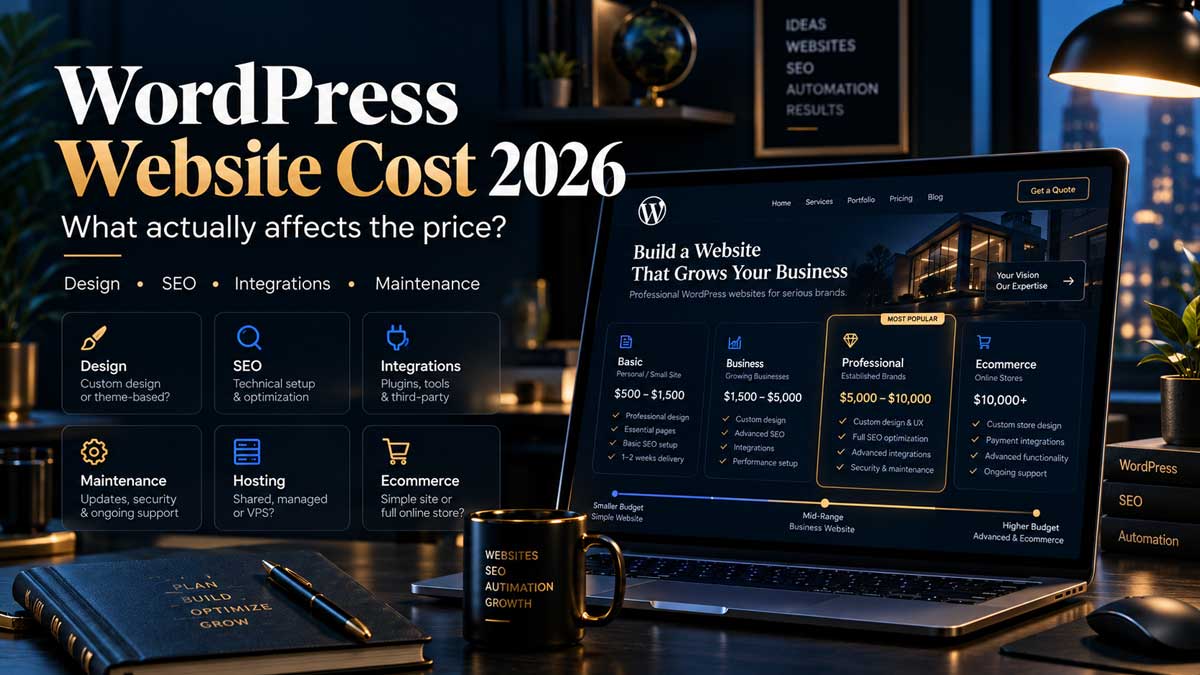
For planning purposes, most WordPress projects fall into a few broad categories.
| Project type | Typical planning range | What usually changes the price |
|---|---|---|
| Basic or template-based business site | $500–$2,000+ | Theme setup, page count, content and basic forms |
| Professional small-business WordPress site | $1,500–$8,000+ | Customisation, UX, SEO, performance and integrations |
| Custom business website | $5,000–$20,000+ | Custom design, functionality, content architecture and development |
| Ecommerce or advanced platform | $10,000–$50,000+ | Products, payments, integrations, custom workflows and scale |
These ranges should not be treated as fixed price lists. Current 2026 market guides vary considerably because providers use different definitions of “custom,” “professional,” and even “website.” One source may call a modified premium theme a custom site, while another uses the term only for a website designed and developed around a business's specific requirements.
That difference matters more than the platform itself.
WordPress is open-source software and does not require a licence fee for using the core platform. WordPress.org explicitly allows the software to be used, modified and extended commercially without paying a WordPress software licence. The cost of a professional project comes from everything around the platform: strategy, design, development, hosting, premium tools, integrations, content, SEO, testing and ongoing maintenance.
Why Can Two WordPress Quotes Be Thousands of Dollars Apart?
Imagine two businesses asking for a “10-page WordPress website.”
The first already has its branding, photographs and final copy. It needs an existing theme configured, a contact form added and ten pages entered into WordPress.
The second wants customer research, new information architecture, conversion-focused copy, custom layouts, responsive design, technical SEO, analytics, CRM integration, automated lead routing, performance optimisation and post-launch support.
Both projects may finish with ten visible pages, but they are not remotely the same amount of work.
This is why page count alone is a weak way to price modern website development. A single page containing custom booking logic, dynamic data and several integrations can require more work than ten straightforward content pages.
The cost is usually driven by the number of decisions and systems behind the pages, not just the number of pages visitors can see.
A professional quote should therefore make the scope visible. If one provider quotes $1,000 and another quotes $6,000, the useful question is not immediately, “Why is the second one so expensive?” It is, “Are these actually quotes for the same project?”
Often, they are not.
Template-Based WordPress vs Custom WordPress
Using a template is not automatically a bad choice.
For a new company that needs a credible online presence quickly, adapting a well-built theme can be a sensible use of budget. The problem begins when a template configuration is presented and priced as if it were bespoke strategy and development.
A template-based project starts with an existing visual and technical structure. The developer adapts colours, typography, images, content and selected layouts to match the business. This can reduce both development time and cost, but the website has to work within more of the template's assumptions.
A custom project approaches the problem in the opposite direction. The structure is based on the company's users, content, conversion goals and technical requirements. Design decisions are made around the business rather than around what a purchased theme happens to provide.
This does not mean every company should pay for fully custom development. The right choice depends on what the website is expected to do.
If the primary objective is simply to establish trust and make it easy for visitors to contact the business, a carefully implemented theme may be enough. If organic search, lead generation, content marketing, multilingual expansion or complex integrations are important growth channels, investing more heavily in architecture and customisation usually becomes easier to justify.
What Should Be Included in a Professional WordPress Project?
A useful way to evaluate a website proposal is to look beyond the final design and examine the process that creates it.
A professional project normally begins before WordPress itself is installed. Someone has to understand what the business offers, who the website is for and what users should do after arriving. Those decisions influence navigation, page structure, calls to action and ultimately the way the site is built.
Design then has to solve more than appearance. A visually impressive homepage is not particularly useful if visitors cannot understand what the company does or find the next step. Good design supports hierarchy, readability, mobile behaviour, trust and conversion.
Development turns that design into a maintainable system. This includes responsive behaviour, content management, forms, performance, security considerations, browser testing and any custom functionality required by the project.
Then there is the work that is easy to miss in a screenshot: analytics configuration, redirects, technical SEO, structured content, image optimisation, accessibility checks, backups, staging environments and quality assurance.
Two websites may look similarly polished on launch day while being completely different underneath.
The cheaper one is not necessarily worse, and the expensive one is not automatically better. What matters is whether the implementation supports what the business needs to do after launch.
SEO Can Change the Real Cost of a WordPress Website
A common budgeting mistake is treating SEO as something that will be “added later.”
Some SEO activities absolutely happen after launch, especially content development, authority building and ongoing optimisation. But many important decisions are much easier to make during the website project.
URL structure, information architecture, internal linking, heading structure, page templates, redirects, crawlability and performance all interact with search visibility. Building those systems without considering SEO and then correcting them later can result in paying twice for the same area of the website.
For example, imagine an existing company redesigning a site that already receives organic traffic. If the new developer changes URLs without a redirect plan, removes useful content or restructures important pages without understanding their search performance, the project can create an SEO problem even though the new design looks better.
This is why the cheapest redesign is not necessarily the lowest-cost option over time.
A website intended to generate search traffic should ideally be planned with SEO in mind before development is complete, rather than waiting for an SEO specialist to audit the finished site and discover structural problems that could have been avoided earlier.
Integrations and Automation Can Increase the Budget — but Also the Value
Modern business websites increasingly connect to other systems.
A contact form may need to create a lead inside a CRM. A new enquiry may need to notify a sales team, trigger an email sequence, create a task or send data to another internal system. An ecommerce order may need to communicate with accounting, inventory or fulfilment tools.
At that point, the project is no longer just about displaying pages.
It is becoming part of the company's operational infrastructure.
This is where tools such as APIs, webhooks and workflow automation platforms can change project scope significantly. A simple contact form may take very little time to implement. Designing a reliable lead workflow that validates data, creates a CRM record, routes the lead, sends notifications and handles errors requires considerably more planning.
That additional work should not automatically be viewed as unnecessary expense. If an integration removes repetitive manual work every week, the business value can be much greater than the development cost.
The important part is to separate essential functionality from features that sound impressive but do not solve a real problem.
A good website proposal should explain why an integration exists, not simply list technologies.
What Does a WordPress Website Cost After Launch?
The project fee is only part of the cost of owning a website.
A self-hosted WordPress site needs a domain and hosting, while many professional sites also use paid plugins or external services for functionality such as forms, backups, security, multilingual content, email, ecommerce or advanced integrations.
WordPress itself remains open source, so these recurring costs come from the surrounding infrastructure rather than from a licence to use WordPress.
For ecommerce, the numbers can become more significant. WooCommerce's core platform is free and open source, but WooCommerce's own current pricing guide notes that stores may pay separately for hosting and extensions. It gives a broad hosting range of roughly $25 to $350 per month for stores and lists many extensions in the $29 to $299 per year range. Actual costs depend heavily on traffic and functionality.
Maintenance is another area that should be discussed before launch.
WordPress, themes and plugins change over time. Updates need to be applied safely, backups need to exist, forms should continue working and security or compatibility problems may eventually need attention.
Some businesses manage this internally. Others pay their developer or agency for ongoing support.
Neither model is automatically better, but the responsibility should be clear.
A cheap website that nobody maintains can eventually become more expensive than a slightly larger initial investment with a clear support plan.
How Should You Compare WordPress Quotes?
Comparing only the final price usually produces poor decisions.
Instead, compare what each provider is taking responsibility for.
A few questions reveal a great deal about a proposal:
Is the site based on an existing theme or designed specifically for the project?
Who is responsible for the content, images and page structure?
Are technical SEO, analytics and redirects included?
Are premium plugin licences included temporarily or owned by the client?
What happens to the website if the working relationship ends?
Is post-launch support included, and for how long?
These questions help expose the difference between a website as a visual deliverable and a website as a business system.
Ownership deserves particular attention. One of the advantages of open-source WordPress is control: WordPress.org explicitly emphasizes the ability to control the software and your data. Make sure the practical implementation preserves that advantage by clarifying access to hosting, domain registration, admin accounts and any paid third-party services.
What Budget Makes Sense for Your Business?
There is no universal budget that every company should spend.
A new business testing an offer should probably not build the same website as an established company relying on organic search and inbound leads for a significant share of revenue.
For a small business that needs a professional marketing site, current 2026 US pricing sources commonly place capable freelancer projects somewhere in the low-to-mid thousands of dollars, while agencies typically begin higher because the project may involve designers, developers, strategists and project managers.
That does not mean you should simply choose a number from a market guide.
Instead, work backwards from the role of the website.
If it is primarily a digital business card, complexity should remain low.
If it needs to rank in competitive search results, generate qualified enquiries, publish large amounts of content and integrate with other business systems, the scope is naturally different.
The key is not to buy the most expensive website you can afford. It is to avoid paying for functionality you do not need while also avoiding shortcuts in the areas that directly affect revenue, maintainability and future growth.
The Real Question Is What the Website Needs to Achieve
WordPress makes it possible to build relatively simple websites and highly sophisticated digital platforms on the same underlying CMS. That flexibility is one of the reasons pricing varies so widely.
A $1,000 WordPress project and a $15,000 WordPress project are not necessarily competing versions of the same product. They may represent completely different levels of strategy, design, customisation, functionality and responsibility.
Before requesting a quote, define what success looks like. Decide whether the website needs to generate leads, support SEO, sell products, integrate with other systems or simply establish a professional presence.
Then compare proposals based on how well they solve those requirements.
A good WordPress project should leave you with more than a set of attractive pages. You should understand how the site is structured, what you own, what the ongoing costs are, how it will be maintained and how it supports the next stage of the business.
If you are planning a new WordPress website or replacing an existing one, the most useful first step is to define the scope before discussing the final price. That makes it possible to separate necessary investment from unnecessary complexity and build a website around the result you actually need.