
n8n Lead Generation Automation in 2026: From Website Form to Qualified CRM Lead
A practical guide to building an n8n lead automation system that captures website enquiries, validates and enriches lead data, scores prospects, updates your CRM, routes qualified opportunities to the right person, and makes sure no valuable lead disappears in an inbox.

IN THIS ARTICLE Table of contents 19 sections
Most businesses do not lose leads because they lack a contact form.
They lose them somewhere after the form is submitted.
A prospect fills in a website form. The enquiry reaches an inbox. Someone needs to read it, decide whether the lead is relevant, copy the information into a CRM, look up the company, assign the right salesperson, send a response, and remember to follow up.
When volume is low, that process may seem manageable.
As soon as the business gets busier, the weaknesses appear. Some enquiries sit unanswered. Duplicate contacts are created. Salespeople spend time researching poor-fit prospects. High-value leads receive the same generic treatment as low-priority enquiries, and management cannot easily see where leads are being lost.
This is where n8n becomes much more useful than a simple “form to email” automation.
A properly designed lead workflow can turn a raw website submission into a structured, validated, enriched, scored and routed sales opportunity within a single process.
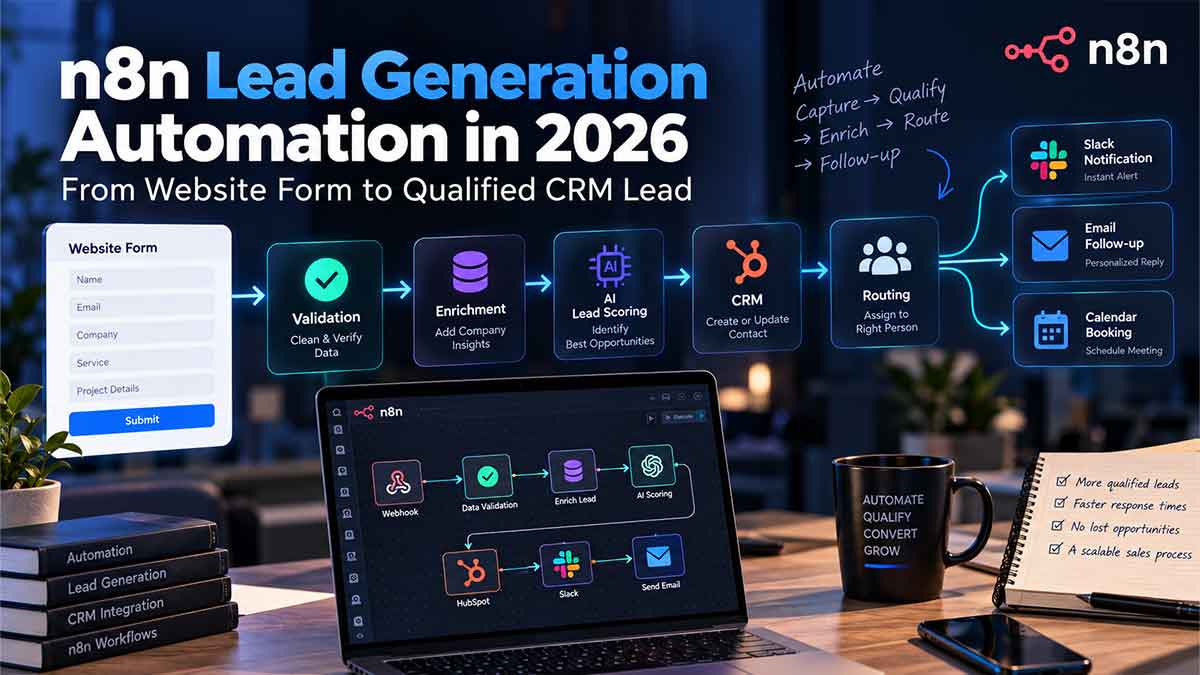
Current workflows published in the n8n ecosystem already demonstrate this pattern: receive form data through a webhook, validate it, enrich the record, calculate a qualification score, create or update the CRM contact, notify the appropriate person and log the result. n8n
The important part is not the number of nodes in the workflow.
It is the business logic between them.
Lead automation should start with the process, not n8n
A common mistake is opening n8n and immediately dragging nodes onto the canvas.
Webhook.
OpenAI.
HubSpot.
Slack.
Gmail.
Technically, that may produce a working automation.
But it does not necessarily produce a good lead-management system.
Before building anything, define what should happen when a lead enters the business.
Imagine a web design company receives three enquiries.
The first is a student asking for free advice.
The second is a small business looking for a basic website six months from now.
The third is an established company that needs a WordPress redesign, has an existing budget, receives significant organic traffic and wants the new website launched within six weeks.
Those are three form submissions.
They should not necessarily receive the same internal treatment.
A useful lead automation needs to answer questions such as: Is the submission valid? Is this person already in the CRM? Does the company match the target customer profile? How urgent is the request? Which service are they interested in? Which salesperson or consultant should receive it? What should happen when important information is missing?
Only after these decisions are clear should n8n implement them.
Automation works best when it turns an existing decision process into a reliable system.
It works poorly when the workflow itself is expected to invent the business process.
The basic architecture: form submission to qualified lead
A practical n8n lead pipeline can be thought of as a sequence of transformations.
Website Form → Validation → Normalisation → Deduplication → Enrichment → Qualification → CRM → Routing → Notification → Follow-up → Monitoring
Each stage solves a different problem.
The form captures what the prospect knows.
Validation checks whether the submission is usable.
Normalisation turns inconsistent inputs into predictable data.
Deduplication prevents the same person from becoming multiple CRM records.
Enrichment adds context the lead may not have provided.
Qualification estimates whether the opportunity fits the business.
CRM sync creates the long-term record.
Routing decides who owns the opportunity.
Notifications make the important leads visible.
Follow-up confirms that the prospect has been received.
Monitoring makes sure the automation itself is working.
This architecture is already reflected in current n8n workflow examples for lead management. Some templates accept web form submissions via webhook, enrich the lead through external services, update HubSpot, and alert the sales team in Slack. Others merge multiple lead sources into one qualification and routing pipeline. n8n
The exact tools can change.
The architecture remains useful.
Start by capturing the lead reliably
For a business website, the workflow usually begins in one of two ways.
The first is an n8n Form Trigger.
The second is a webhook receiving data from an existing website form.
If the company already has a WordPress site, landing-page builder, React application or custom Django form, there is often no reason to rebuild the front end inside n8n. The existing form can simply send its submission to the workflow.
That is especially useful when automation is being added to an established website.
The user still sees the same contact experience.
Behind the scenes, the process changes completely.
For example, a WordPress enquiry could send:
name, email, phone number, company, website, requested service, budget range, project description and preferred timeline.
n8n receives that payload and begins processing it.
This is also where the relationship between [website development and automation](/#services) becomes important. A good form is not only a visual component. The fields you collect determine what the workflow can reliably do later.
If qualification depends heavily on project budget but the form never asks anything about budget, the automation starts with missing information.
If routing depends on country but location is not collected or inferred, somebody will eventually need to make that decision manually.
Automation design therefore sometimes improves the form itself.
Validate before you automate anything expensive
Every form submission should not immediately create a CRM opportunity and call an AI model.
First establish whether the data is valid.
A submission may contain an invalid email address, empty required fields, malformed phone numbers, spam, bot traffic or unexpected payloads.
Current n8n workflows for web-form capture commonly include validation and normalisation before passing records into the rest of the pipeline. Some also authenticate webhook requests using a shared secret before processing the payload. n8n
This is a good design pattern for two reasons.
First, bad data becomes expensive when it spreads.
If one invalid form submission creates a CRM contact, triggers enrichment APIs, sends Slack notifications and starts an email sequence, the workflow has multiplied one bad input into several bad actions.
Second, lead data becomes easier to work with when it has a consistent format.
For example, email addresses can be normalised to lowercase. Names can be trimmed. Phone numbers can be standardised. URLs can be cleaned. Timestamps can be added.
The objective is to turn uncontrolled user input into a predictable internal record.
Deduplication should happen before CRM creation
One of the easiest ways to damage a CRM is to automate record creation without checking whether the record already exists.
A prospect might submit a general contact form in January, download a resource in March and request a proposal in June.
Those are three events.
They may still be one person and one company.
Creating a new CRM record every time fragments the history.
Salespeople lose context and reporting becomes unreliable.
A better workflow searches the CRM using a stable identifier, commonly the email address or company domain, before deciding whether to create or update the record.
A current n8n HubSpot workflow demonstrates this exact approach: validate and normalise incoming web-form data, search HubSpot by email, then update an existing contact or create a new one depending on the result. n8n
The same concept applies beyond HubSpot.
The CRM might be Salesforce, Pipedrive, HighLevel, Twenty, Airtable or a custom database.
The important requirement is idempotent behaviour: running the process twice should not unnecessarily create two customers.
Enrichment turns a form response into useful sales context
A lead normally knows less about your qualification process than you do.
They may provide only:
“Hi, we need help with SEO. Please contact me.”
That message may represent a poor-fit enquiry.
It may also come from a company that would be an excellent client.
Enrichment can reduce that uncertainty.
Based on the submitted email or company domain, a workflow may be able to add company name, website, sector, location, company size, job title or other useful business information through appropriate enrichment providers or APIs.
Current n8n templates demonstrate this pattern with providers such as Hunter and Lusha, combining external data with the original form submission before updating the CRM. n8n
This is where HTTP and API flexibility becomes particularly useful.
n8n's documentation describes the platform as a tool for connecting applications through APIs with little or no code, while also supporting custom integrations when a dedicated node does not cover the required operation. n8n Documentation
The practical benefit is that the lead pipeline does not need to be limited to whichever SaaS applications happen to have the simplest native connector.
But enrichment should have a purpose.
Adding twenty fields nobody uses only creates a more expensive database.
Each enrichment field should help with qualification, routing, personalisation, reporting or sales context.
Lead scoring should reflect your actual ideal customer
This is where many automation projects become unnecessarily complicated.
Someone adds an AI node and asks the model:
“Is this a good lead?”
That may look intelligent.
It is also vague.
A useful qualification system needs to define what “good” means for the business.
For a web design and SEO consultant, the relevant signals could include service fit, existing website, company type, urgency, project scope and whether the enquiry provides enough detail to indicate a real buying process.
For a B2B SaaS company, company size and role may matter more.
For a property business, budget, location and buying timeline may dominate.
One current n8n lead-routing template evaluates criteria such as industry, company size, buyer role, problem clarity and budget signals, then converts those signals into a score and lead tier. n8n
The scoring system should follow the business.
The business should not reshape its qualification criteria around whichever fields are easiest for an AI model to process.
AI is useful for interpretation; business rules are better for control
There is a particularly useful pattern in AI-assisted lead qualification.
Let the model interpret messy information.
Let deterministic logic make important decisions.
Suppose a prospect writes:
“We have a WordPress website that ranks well, but it is slow and difficult to maintain. We want a redesign before our new product launch in two months.”
An AI model can help extract structured meaning from that message:
service: WordPress redesign
SEO risk: high
urgency: high
business objective: product launch
existing asset: established website
That is a useful application of AI.
But the final routing rule can still remain deterministic.
For example, if redesign intent is confirmed, urgency is high and the company meets your minimum project criteria, classify it as Priority.
This architecture makes the workflow easier to audit.
A current n8n template follows a similar model: AI extracts structured information, while a code step applies transparent scoring criteria and assigns Hot, Warm, Cold or Unqualified categories. n8n
That is generally safer than allowing a language model to control every part of the process without clearly defined boundaries.
AI is particularly useful when the input is unstructured.
Rules are particularly useful when consistency matters.
A strong workflow uses both where appropriate.
Not every business needs AI lead scoring
This is worth stating clearly because AI is often added to Automation unnecessarily.
If your website form already asks:
service, company size, budget, country and timeline,
you may be able to qualify leads entirely with deterministic logic.
For example, a Switch or IF structure may be enough to classify leads.
That is cheaper, easier to understand and easier to test.
AI becomes more valuable when important information is contained in free text, when the workflow needs to summarise context, when categories are difficult to determine with simple rules, or when enrichment data requires interpretation.
Using an LLM where a basic condition would work is not sophistication.
It is extra complexity.
This is one of the reasons automation architecture should come before tool selection.
Route qualified leads immediately
Qualification only creates value if the result changes what happens next.
A high-priority lead should not receive a score of 92 and then sit inside a Google Sheet waiting for someone to notice it.
Once the workflow has determined the category, it can route the opportunity based on whatever logic the business uses.
That might mean assigning SEO enquiries to one person and WordPress projects to another.
It could use country, language, account ownership, service category, deal size or salesperson availability.
Current n8n lead templates commonly use this pattern, sending high-value leads into the CRM and simultaneously notifying the relevant salesperson through Slack or email. n8n
The notification itself should contain enough context to be useful.
“New website lead” is not particularly helpful.
A better internal alert might show the person, company, requested service, qualification tier, project summary and a direct link to the CRM record.
The objective is to reduce the time between “new lead exists” and “the right person understands why it matters.”
The prospect should also receive an immediate response
Internal notifications solve only half of the problem.
The prospect also needs confirmation that their request was received.
This does not necessarily require an AI-written sales email.
In many cases, a predictable acknowledgement is better.
The message can confirm receipt, explain what will happen next and set realistic expectations.
Different categories can receive different next steps.
A qualified consultation request may receive a calendar booking option.
A general enquiry may receive a normal acknowledgement.
A lead that requires additional information may receive a short request for the missing details.
A current n8n template demonstrates this broader structure, where qualified leads can trigger scheduling and confirmation while non-qualified leads follow a different nurture path. n8n
The automation should support the sales process.
It should not pretend every submission deserves an aggressive sales sequence.
Your CRM should remain the source of truth
It is tempting to use n8n itself as the place where everything lives.
That is usually not the best architecture.
n8n is excellent as the orchestration layer.
It receives events, transforms information and coordinates systems.
The CRM should normally remain the long-term source of truth for customer and opportunity history.
That means the workflow should write useful information back into the CRM:
lead source, service interest, qualification score, enrichment data, owner, status and relevant context from the submission.
If the prospect contacts the company again six months later, the sales team should not need to inspect old workflow executions to understand what happened.
The record belongs in the system designed to manage customer relationships.
The automation is the plumbing between systems.
Failure handling is part of the lead pipeline
This is where a demo workflow becomes a production workflow.
Imagine the CRM API is temporarily unavailable.
What happens to the lead?
If the workflow simply fails at the CRM node, a valuable enquiry can disappear unless someone notices the failed execution.
A reliable system should define failure behaviour.
The lead might be written to a fallback table, error workflow or queue.
An internal alert can be generated.
The failed execution can then be retried after the underlying problem is fixed.
n8n provides execution history where workflows can be filtered by status, inspected and retried, including retrying previous data after the workflow has been corrected. n8n Documentation
This matters because external systems fail.
APIs rate-limit requests.
Credentials expire.
Payload formats change.
CRM services become unavailable.
Production automation should assume these things can happen.
The goal is not to create a workflow that never fails.
The goal is to create a system where failure does not silently lose the lead.
Secure the webhook instead of treating it like a public inbox
A website webhook receives external input.
That means it needs the same level of thought you would give any public endpoint.
Do not assume every POST request reaching the workflow came from your legitimate contact form.
Depending on the architecture, controls can include a shared secret, request authentication, payload validation, rate limiting at the infrastructure layer, spam controls on the form and strict handling of unexpected fields.
This is particularly important for self-hosted environments.
n8n's own security-audit documentation specifically includes unprotected webhooks among the risks its instance audit can report. n8n Documentation
The automation should also avoid passing sensitive information into external AI or enrichment services unless doing so is genuinely required and appropriate for the business's privacy obligations.
A good automation is not only fast.
It is deliberately designed around where data enters, where it travels and who can access it.
WordPress plus n8n can turn the website into part of the sales system
This is one of the areas where automation and web development overlap most clearly.
A traditional WordPress contact form often ends with an email.
The customer submits the form.
WordPress sends a message.
Someone reads it later.
With n8n, the same form can become the starting point for a structured pipeline.
The WordPress website remains responsible for the user experience and conversion.
n8n handles the operational steps after conversion.
The CRM stores the customer record.
Slack or email handles team notification.
Calendar software can handle booking.
An enrichment API can add business context.
An AI model can interpret an unstructured project description when necessary.
This is more useful than thinking of web design and automation as unrelated services.
A website produces more business value when its conversion points are connected to what happens next.
That is why a future automation layer fits naturally alongside the [web development and digital services](/#services) already represented on the site.
What should you measure after the workflow goes live?
The wrong KPI is:
“n8n processed 2,000 executions.”
That tells you the automation ran.
It does not tell you whether it improved the business.
A better measurement framework connects workflow performance to sales operations.
| Metric | What it tells you |
|---|---|
| Valid lead rate | Whether form quality and validation are working |
| Duplicate rate | How much CRM duplication the workflow prevents |
| Qualification rate | How many submissions match your target criteria |
| Routing accuracy | Whether leads reach the correct owner |
| Response latency | How quickly the system acknowledges and routes enquiries |
| Workflow failure rate | Whether technical reliability is acceptable |
| Lead-to-opportunity rate | Whether qualified leads become real sales opportunities |
| Opportunity by source | Which forms and channels create the most useful leads |
This is where automation becomes measurable rather than impressive-looking.
A workflow with 40 nodes is not automatically better than one with 12.
If the smaller workflow reliably captures every enquiry and gets qualified prospects to the right person, it may be the stronger system.
When should you automate this process?
Lead automation becomes particularly useful when the business is already experiencing operational friction.
Perhaps several people monitor the same inbox.
Maybe leads are copied manually into spreadsheets.
The sales team regularly asks where enquiries came from.
Some prospects receive quick responses while others wait much longer.
Duplicate records are common.
People repeatedly research the same company information.
Or perhaps the business simply wants to make sure growth does not create administrative chaos.
You do not need thousands of leads per month for automation to make sense.
The important question is whether the process is repetitive, rule-based enough to automate and valuable enough that mistakes matter.
For a consultant receiving five highly valuable enquiries a month, losing one can be more important than processing hundreds of low-value leads for another business.
Volume is only one factor.
Lead value matters too.
What I would not automate first
A lead workflow should not try to replace the entire sales process on day one.
I would not begin by giving an AI agent full authority to qualify every prospect, write every sales message, negotiate scope and schedule calls without clear controls.
Start with the boring problems.
Capture every lead.
Clean the data.
Stop duplicates.
Create the CRM record.
Notify the right person.
Make sure the prospect receives acknowledgement.
Record failures.
Once those parts work reliably, enrichment and AI-assisted qualification can be added where they provide measurable value.
This is usually a much safer way to deploy business automation.
Reliability first.
Intelligence second.
A good n8n lead workflow should make sales simpler
The purpose of lead automation is not to build the most impressive canvas in n8n.
The purpose is to remove unnecessary work between a prospect asking for help and the business responding intelligently.
A good system knows where the lead came from.
It validates the information.
It avoids duplicates.
It adds context when context is useful.
It applies qualification criteria consistently.
It records everything in the CRM.
It gets important opportunities in front of the right person.
And when something breaks, it makes the failure visible instead of quietly losing the enquiry.
That is the difference between a Workflow Demo and Business Automation.
If you currently receive enquiries through WordPress, a custom website, landing pages or email and still qualify or route them manually, the first step is not choosing an AI model.
Map the existing lead process.
Identify where information gets copied, delayed or lost.
Then decide which parts should be automated and which decisions should remain human.
You can review the [services](/#services) and [portfolio](/#portfolio), or [send the current lead process and tools you use](/#contact) to evaluate how a website form, CRM, n8n, notifications and follow-up could be connected into a more reliable lead pipeline.