
AI Agents vs Workflows in 2026: Which Is Better?
Should your business use an AI agent, a traditional automation workflow, or a combination of both? This practical 2026 guide compares reliability, cost, security, flexibility and real business use cases, with an n8n architecture example and a decision framework for choosing the right approach.

IN THIS ARTICLE Table of contents 20 sections
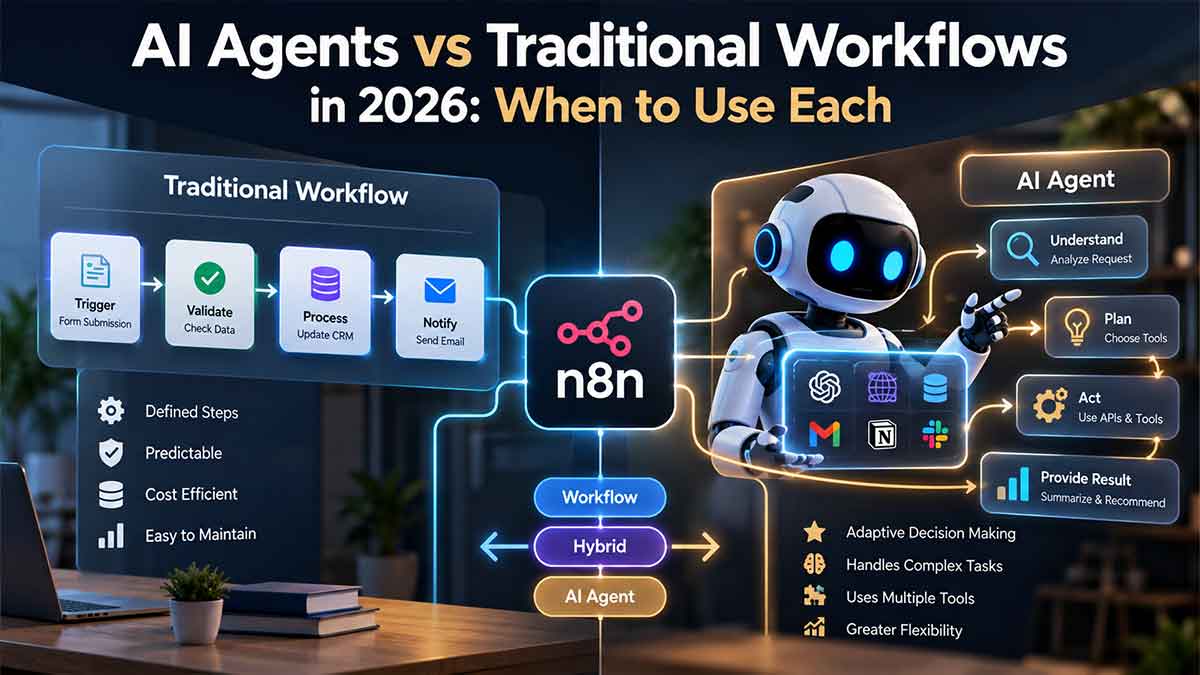
An AI agent can choose its next action. A traditional workflow follows the steps you have already defined.
That is the most important difference between the two.
If your business needs to transfer information from a website form into a CRM, validate the fields and notify the right person, a traditional workflow may be all you need.
If the task involves reading an unpredictable customer request, investigating information across several systems, deciding which tools are relevant and adapting when new facts appear, an AI agent may be more useful.
And if the process contains both predictable and unpredictable work, the best solution is often a combination of the two.
This distinction matters more in 2026 because AI agents are becoming easier to build and connect to business applications. Platforms such as n8n now allow developers to combine predefined workflows with AI models that can select tools and perform multi-step tasks.
But easier access to agent technology does not mean every business process needs an agent.
The real decision is not whether AI agents are more advanced than traditional automation. It is whether giving software more freedom to make decisions will produce enough business value to justify the additional complexity, cost and risk.
A useful automation strategy begins with the problem, not the technology.
What is the difference between an AI agent and a traditional workflow?
A traditional workflow is a sequence of operations designed in advance.
It usually starts with a trigger: a form submission, a scheduled time, a database update, an incoming email or an event from another application.
The workflow then performs actions according to predefined rules.
For example, an ecommerce store might use automation to receive an order, validate payment status, update inventory, generate an internal notification and send the customer a confirmation email.
The system does not need to reason about what to do next.
The developer already defined the process.
This is sometimes called deterministic automation because the execution path is controlled by explicit rules, although outcomes can still be affected by API errors, unexpected data or other external conditions.
An AI agent works differently.
Instead of receiving only a fixed sequence, it receives an objective and access to selected tools.
The agent can examine available information, decide which tool to call, interpret the result and determine whether another action is necessary.
For example, an AI support agent might receive a message saying:
"Our subscription was renewed yesterday, but the invoice looks wrong and we cannot access the features included in our plan."
A fixed workflow could route the message to billing support.
An agent with appropriate access might go further. It could inspect the customer record, retrieve invoice details, compare the active subscription with the account permissions, identify possible inconsistencies and prepare a summary for the support team.
The sequence of investigation may vary depending on what the agent discovers.
That flexibility is the advantage.
It is also the source of additional risk.
The essential difference is who decides the next step: the workflow designer or the AI model.
There are three useful architectures, not just two
Many comparisons treat AI agents and workflow automation as competing choices.
For real business systems, that framing is too restrictive.
There are actually three practical approaches worth evaluating.
| Architecture | How it works | Best suited to | Main trade-off |
|---|---|---|---|
| Traditional Workflow | Executes predefined steps and rules | Data syncing, notifications, validation, scheduled tasks | Limited flexibility when exceptions change the process |
| AI-assisted Workflow | Uses AI for specific tasks inside a controlled workflow | Classification, extraction, summarisation, drafting | AI output still requires validation |
| AI Agent | Chooses among permitted tools and actions to achieve a goal | Investigation, adaptive research, complex support, variable multi-step tasks | Greater variability in cost, latency and behaviour |
The middle option deserves particular attention.
An AI-assisted workflow does not require an autonomous agent.
Imagine a WordPress website receiving project enquiries.
A submission enters n8n. The workflow validates the email address, checks the CRM for an existing contact and reads the requested service.
Most of this process is completely predictable.
However, the user may write a long, unstructured description of their project.
An LLM can interpret that description and extract structured information, such as whether the enquiry concerns SEO, a WordPress redesign, website migration or automation.
The workflow then applies predefined rules to the model's output.
It creates or updates the CRM record, assigns the responsible person and sends the notification.
In this architecture, AI handles one difficult interpretation task.
The workflow still controls the overall process.
For many small and medium-sized businesses, this is a better starting point than a fully agentic system.
When should you choose traditional workflow automation?
Traditional workflows are generally the better choice when the process is repetitive, the inputs are predictable and the rules are already known.
Consider a company that receives contact forms from multiple landing pages.
Every valid submission needs to enter the CRM. Duplicate records should be prevented. The service category determines the assigned team, and the prospect should receive a confirmation email.
There is no obvious need for autonomous reasoning.
A well-designed n8n workflow can coordinate those actions using validation, CRM nodes, conditions, API requests and notifications.
The same principle applies to scheduled reporting, order confirmations, database synchronisation, appointment reminders and many administrative processes.
Traditional workflows offer three significant advantages.
The first is predictability.
When a condition is satisfied, the system follows the corresponding rule. This makes expected behaviour easier to define and test.
The second is transparency.
If a lead was assigned to the wrong salesperson, a developer can inspect the routing conditions and identify which rule produced the result.
The third is operational efficiency.
A workflow that moves structured data between systems does not need to invoke a language model at every step. Avoiding unnecessary model calls can reduce latency, API spending and implementation complexity.
However, conventional automation also has limitations.
As the number of exceptions increases, workflows can become difficult to maintain.
If handling a customer request requires dozens of conditions and every new scenario introduces another branch, the process may be approaching the point where AI-assisted interpretation becomes valuable.
The correct response is not necessarily to replace the entire workflow with an agent.
It may be enough to introduce intelligence at the point where the uncertainty occurs.
When does an AI agent become the better choice?
An AI agent becomes more interesting when the next useful action cannot always be determined before the task begins.
This frequently happens in research, investigation, troubleshooting and information-heavy customer operations.
Imagine a digital agency receives a request:
"Our website traffic has declined since we changed our checkout system. We also migrated several product categories, and our developers are unsure whether the problem is related to redirects, JavaScript or indexing."
A conventional workflow can create a support ticket.
An AI-assisted workflow can classify the message and summarise the likely issues.
An agent, operating with limited and approved tools, could potentially investigate further.
It might retrieve relevant analytics reports, examine Search Console exports or available site-audit data, inspect the migration documentation and compare the evidence.
Based on what it finds, it could decide whether to examine another source or prepare an initial diagnostic report for human review.
The investigation path is not completely known in advance.
That is where agentic behaviour can add value.
However, this example illustrates an important boundary.
An agent capable of investigating an SEO issue should not automatically receive permission to change production robots.txt, remove redirects or modify indexing rules.
The ability to understand a problem and the authority to change a live system are separate decisions.
A strong architecture allows flexible investigation while keeping consequential actions under explicit controls.
The most useful approach for many businesses is hybrid automation
In practical projects, I would rarely begin by asking whether the entire process should be traditional or agentic.
I would divide the work according to where uncertainty exists.
Take an incoming customer-support request.
The first stage is predictable: receive the message, identify the customer, validate required information and create a case.
Then the system reaches an uncertain stage.
The customer may be asking about billing, delivery, a technical error or a contract.
AI can interpret the message and identify the relevant context.
For common requests, a straightforward workflow may handle the next action.
For more complicated requests, a bounded agent can investigate using approved documentation and customer information.
The final stage becomes predictable again: record the outcome, update the ticket, notify the owner and request approval before sending a sensitive response.
The architecture looks like this:
Trigger → Validation → AI Interpretation → Controlled Decision → Agent Investigation (when needed) → Output Validation → Human Approval (when needed) → Business Action → Logging
This structure is more deliberate than simply connecting a powerful model to every business application.
The workflow defines where autonomy begins and where it ends.
That boundary is one of the most important architectural decisions in an AI automation project.
A practical n8n example: qualifying an incoming lead
Consider a hypothetical B2B company that receives leads through WordPress.
A potential customer submits a form explaining that the business needs a new website, has an existing SEO strategy and wants the redesign completed before launching a new service.
The form submission triggers n8n.
A conventional workflow first validates the payload and checks whether the email address already exists in the CRM.
An AI classification step then interprets the project description and extracts service interest, urgency, website-migration risk and other useful signals.
The output is validated against an expected structure.
A deterministic scoring rule decides whether the enquiry fits the company's qualification criteria.
If the lead is straightforward, the workflow updates the CRM and notifies the assigned consultant.
If the request is unusually complex, an agent may be allowed to review public company information or approved internal resources and prepare a short research summary.
That summary is attached to the CRM record.
The workflow can then assign the lead to a human consultant.
Notice what the agent is not doing.
It is not automatically committing to a price, promising a delivery date, signing an agreement or modifying production systems.
Its job is to reduce uncertainty before the human sales conversation.
The result is a business process that uses AI where interpretation is valuable without surrendering control of the entire pipeline.
The five questions that should decide your architecture
Before choosing an agent, I would evaluate a process using five questions.
1. Can the steps be written down in advance?
If the answer is yes, start with a workflow.
If the process regularly changes direction depending on new information, an agent may be justified.
There is an important distinction between complex and unpredictable.
A workflow with twenty known steps may be complex, but it does not necessarily need an agent.
A task with only three possible actions may benefit from AI if understanding which action is appropriate requires interpreting complicated information.
2. How structured is the input?
A form containing service, budget, location and timeline fields is relatively structured.
A ten-page customer email thread with contradictory information is not.
Unstructured information is a good reason to consider AI.
It is not automatically a reason to introduce an autonomous agent.
A focused extraction or classification step may solve the problem more reliably.
3. What happens if the system makes a mistake?
This is one of the most important questions in the entire decision.
A wrongly categorised internal note can be corrected with little consequence.
An incorrect refund, deleted customer record or unauthorised contract modification can have a much greater impact.
The higher the consequence, the tighter the system's controls should be.
An agent may be allowed to propose an action without being allowed to execute it.
4. Can the outcome be verified?
Some outputs are easy to validate.
A customer ID either exists or it does not.
A JSON response either follows the required schema or it does not.
A payment amount can be checked against an invoice.
Other outputs are less straightforward.
Was the research comprehensive?
Did the agent misunderstand the customer's intent?
Was a recommendation supported by the evidence?
When verification is difficult, human review and a well-designed evaluation process become more important.
5. Is the additional intelligence economically worthwhile?
An agent may complete a task successfully while still being the wrong business choice.
If a basic workflow performs the same task with lower operating cost, less latency and simpler maintenance, adding autonomy may not provide meaningful value.
The decision should be based on improvement in the actual business outcome, not the sophistication of the implementation.
AI agents vs workflows: cost, reliability and maintenance
Comparing platform subscription prices alone does not reveal the real cost of automation.
A traditional workflow may involve platform execution costs, hosting, API usage, maintenance and monitoring.
An AI-assisted workflow adds model inference costs and the need to validate AI outputs.
An agent may make multiple model calls and tool requests during a single task. Its cost and completion time can vary depending on the investigation.
A useful cost model therefore includes more than tokens.
Total operating cost = Automation infrastructure + Model usage + External API costs + Monitoring + Maintenance + Human review + Failure recovery
This does not mean an agent will always be more expensive.
A capable agent may eliminate substantial manual research or reduce the need for complicated custom development.
But the saving should be demonstrated with real tasks.
Suppose a team currently spends significant time investigating unusual support cases.
An agent that prepares a useful case summary could reduce the amount of human work needed.
That benefit should be compared against model usage, review time, integration complexity and the cost of correcting inaccurate results.
By contrast, using a reasoning model to send a scheduled reminder is unlikely to be a good use of the technology.
The right metric is not cost per agent execution.
It is cost per successfully completed business task.
A slower or more expensive process may still be worthwhile if it saves enough skilled work and produces consistently useful outcomes.
Reliability matters more than a successful demo
A demonstration usually contains clean inputs.
Production does not.
Customers send incomplete messages. APIs become unavailable. Credentials expire. External data contains errors. Different users describe the same problem in completely different ways.
A professional automation system has to deal with that reality.
Traditional workflows are generally easier to test using known inputs and expected outputs.
AI-assisted workflows require an additional layer: evaluating whether the model's interpretation is consistently good enough.
Agents need an even broader evaluation because their tool choices and execution paths may differ across runs.
n8n supports evaluating AI workflows against test cases and expected outputs, helping teams compare changes and identify failures before and after deployment.
That matters because a prompt that performs well on three examples may still behave poorly on the next fifty real requests.
For a production system, testing should include ambiguous requests, incomplete information, duplicate records, conflicting evidence, unavailable APIs and cases where the correct action is to stop and ask for human review.
The objective is not to prove that the agent can complete an impressive example.
It is to understand how often the system produces a useful result, under which conditions it fails and how safely it handles those failures.
A failure should not silently disappear
n8n provides execution history, failed-execution retries and error workflows that can notify a team when processing fails.
These capabilities are valuable for traditional automation and AI systems alike.
Imagine an agent correctly identifies a qualified lead but the CRM API is unavailable.
Without error handling, the entire process may fail after completing the expensive reasoning step.
A more reliable design can retain the incoming record, register the failed operation and provide a controlled retry or manual recovery path.
Side effects also require special attention.
Retrying an operation should not accidentally create duplicate contacts, send repeated customer emails or process the same payment twice.
Idempotency, logging and recovery rules remain essential even when the intelligence inside the workflow becomes more advanced.
Security: an agent should not have access to everything
One of the largest differences between a normal workflow and an agentic system is the degree of freedom involved in selecting actions.
A traditional workflow calls the APIs its developer configured.
An agent can choose among the tools made available to it.
That makes tool permissions a critical design decision.
For example, a reporting agent may need permission to read CRM data.
It probably does not need permission to delete contacts.
A support agent may need access to order information.
It may not need authority to issue refunds without approval.
An SEO research agent may need to inspect website data and produce recommendations.
It should not automatically be able to change live redirects, indexing controls or production code.
This is the principle of least privilege applied to AI automation.
The agent receives only the access required for its specific task.
Untrusted data should also remain untrusted.
A customer email, web page or uploaded document may contain instructions that attempt to influence the agent's behaviour.
Those instructions should not be treated as new system rules simply because the agent encountered them while processing a legitimate task.
Guardrails, constrained outputs, approved tools and human review reduce this risk, although no single control removes it completely.
Human approval becomes especially important when an action is costly, difficult to reverse or affects third parties.
An agent can prepare a recommendation.
A workflow can validate the proposed action.
A person can approve the consequential step.
This separation creates a safer operating model than unrestricted autonomy.
Should you build a multi-agent system?
Not necessarily.
A frequent mistake in AI automation is introducing multiple agents before establishing whether one agent is needed at all.
A system might have a research agent, a planning agent, an execution agent, a reviewing agent and a coordinating agent.
That architecture may be appropriate for certain complicated tasks.
It can also create more handoffs, additional model calls, longer execution times and harder debugging.
If one bounded AI step can classify an incoming request accurately, five agents are unnecessary.
If a single agent can complete an investigation with a small collection of approved tools, dividing the same work across multiple agents may add complexity without improving the outcome.
Multi-agent systems become more useful when tasks have genuinely distinct responsibilities, require parallel investigation or benefit from specialised capabilities.
Even then, the engineering team should be able to explain why the additional structure improves quality, reliability or throughput.
The goal is not to maximise the number of agents.
It is to use the simplest architecture that produces the required result.
How to move from a manual process to production AI automation
The most reliable starting point is to document the process as it operates today.
Identify what triggers the work, which systems contain the necessary information, which decisions are straightforward and where employees spend time interpreting unclear situations.
Then separate the process into predictable and uncertain activities.
Predictable steps belong in conventional automation unless there is a compelling reason to change them.
Interpretive steps may benefit from a focused LLM call.
Tasks that genuinely need adaptive tool selection can be tested with a bounded agent.
Once the basic architecture is clear, define the permissions, validation rules and approval points before connecting real customer data.
Build a small evaluation set using representative cases.
Test normal requests and edge cases.
Record actual processing cost, latency, error rate and human correction effort.
Only then should the system be gradually expanded to more complex tasks or additional tools.
This staged approach has an important benefit.
It allows the business to learn exactly where AI improves the process instead of assuming autonomy is always useful.
What should be measured after launch?
A useful automation dashboard should measure outcomes rather than simply count executions.
For a lead-management process, that might mean the percentage of leads correctly classified, average response time, duplicate-contact rate and the number of qualified enquiries reaching the appropriate team.
For customer support, useful measures might include resolution quality, escalation accuracy, average handling time, incorrect actions and human review effort.
For research workflows, the team may need to measure evidence quality, factual accuracy, completion rate and time saved.
Across all these cases, technical metrics still matter.
Workflow failures, model costs, API errors, processing latency and successful recovery should remain visible.
If the agent creates more review work than it saves, the architecture needs to change.
If the workflow reduces manual activity but frequently produces inaccurate customer records, the automation is not ready simply because it runs without crashing.
Success means the business process is measurably better.
So, which should your business choose in 2026?
Traditional workflow automation remains an excellent choice for structured, repeatable business processes.
AI-assisted workflows are useful when most of the process is predictable but one or more stages require language understanding, classification, extraction or summarisation.
AI agents are worth considering when the system must adapt its plan, choose among tools and investigate information that cannot be organised into a fixed sequence beforehand.
For many businesses, the best architecture is not exclusively one of these options.
It is a controlled combination.
A WordPress form can trigger a conventional n8n workflow.
An AI model can interpret a complicated project request.
An agent can investigate an unusual case using approved sources.
A deterministic workflow can validate the result and update the CRM.
A human can approve decisions that carry meaningful consequences.
This is what practical AI automation should look like: intelligence where it adds value, predictable execution where it matters, and human accountability where mistakes are costly.
The most important question is therefore not, "Should we build an AI agent?"
It is, "Which part of our existing process cannot be handled reliably with predefined rules, and what would improve if that part became more intelligent?"
That question leads to better architecture, clearer budgets and more useful automation projects.
If your business currently relies on WordPress forms, CRM platforms, spreadsheets, email, internal APIs or repetitive manual operations, the first step should be reviewing the actual workflow.
A professional automation architecture review can identify which steps should remain deterministic, which could benefit from AI and whether an agent is justified at all.
The result should be a system designed around your business requirements, not around whichever AI technology happens to be popular this month.